Table of contents
Collapse all-
LICENSING ONLINE SERVICES
- Licenses for Online Services products
- License reassignment rights
- Versions and editions
- Downgrade and down-edition rights
- Online Services plans
- User types
- External users
- Types of Online Services User SLs
- License assignment
- Tenant-level services
- On-premises use rights
- Other types of Online Services licenses
- Commitment
- Buying Online Services
-
WINDOWS 11 (USER)
- Licensing Windows 11
- Activating Windows 11 Enterprise licenses
- Servicing Channels
- Hotpatching
- Licensing virtual desktops
- Additional Software Assurance benefits
- Extended Security Updates
- Copilot in Windows 11
- Windows 11 in Microsoft 365
- Step-up licenses
- Upgrades and downgrades
- Add-on licenses (To-cloud)
- From SA licenses
- Availability of Windows 11 Enterprise licenses
- Resources: Windows 11
- Microsoft resources: Windows 11
- OFFICE 365/MICROSOFT 365 TOOLS
- MICROSOFT 365 APPS
- OFFICE 365 PLANS
- EMS PLANS
-
MICROSOFT 365 PLANS FOR ENTERPRISE USERS
- Microsoft 365 E7
- Teams or (no Teams)?
- License assignment rules
- Using Windows
- Licensing for virtual desktops
- Use of the Microsoft 365 apps
- Licensing for security and compliance
- Step-up licenses
- 3-year commitment term
- Upgrades
- Add-on licenses (To-cloud)
- From SA licenses
- Special rights to Office Professional Plus
- Included Security Compute Units
- On-premises use rights
- Workplace Discount Program
- Availability of Microsoft 365 Enterprise plans
- Other interesting licenses
- Resources: Microsoft 365 plans for Enterprise users
- Microsoft resources: Microsoft 365 plans for Enterprise users
-
MICROSOFT 365 PLANS FOR SMB USERS
- Microsoft 365 Business plan licenses
- License assignment rules
- Combining licenses
- Using Windows
- Licensing for virtual desktops
- Use of the Microsoft 365 Apps
- Licensing for security and compliance
- Step-up licenses
- Upgrades
- Add-on licenses (To-cloud)
- From SA licenses
- On-premises use rights
- Availability of Microsoft 365 Business plans
- Resources: Microsoft 365 plans for SMB users
- Microsoft resources: Microsoft 365 plans for SMB users
-
PLANS FOR FRONTLINE WORKERS
- Frontline Worker plan licenses
- Teams or (no Teams)?
- License assignment rules
- Using Windows
- Licensing for virtual desktops
- Use of the Microsoft 365 Apps
- Licensing for security and compliance
- Step-up licenses
- Upgrades
- Add-on licenses (To-cloud)
- From SA licenses
- On-premises use rights
- Availability of plans for Frontline Workers
- Resources: Plans for Frontline Workers
- Microsoft resources: Plans for Frontline Workers
- PLANS FOR EDUCATION USERS
- OFFICE 365 AND MICROSOFT 365 (NO TEAMS) LICENSES
- STANDALONE ONLINE SERVICES
- MICROSOFT 365 FOR CONSUMERS
-
WINDOWS 365
- Windows 365 Business
- Windows 365 Enterprise
- Windows 365 Flex
- Connection methods
- Windows 365 Reserve
- Windows 365 Government
- Windows 365 for developers
- Windows 365 for Agents
- Disaster Recovery
- Windows 365 Link
- Windows 365 or Azure Virtual Desktop?
- Resources: Windows 365
- Microsoft resources: Windows 365
- VIVA
-
COPILOT
- Microsoft 365 Copilot Chat
- Microsoft Copilot Pro
- Microsoft 365 Copilot Business
- Microsoft 365 Copilot
- Microsoft 365 Copilot for Education
- Microsoft 365 Copilot for US Government
- Sales Agent (Sales in Microsoft 365 Copilot)
- Service in Microsoft 365 Copilot
- Finance Solution in Microsoft 365 Copilot
- Agent 365
- Copilot Cowork
- Microsoft Scout
- Security Copilot
- Dragon Copilot
- GitHub Copilot
- Copilot Studio
- Copilot in Azure
- Resources: Copilot
- TEAMS
- TEAMS MEETINGS AND EVENTS
- TEAMS CALLING
- TEAMS ROOMS, DEVICES, AND SPACES
- VISIO ONLINE
- MICROSOFT PROJECT
-
MICROSOFT DEFENDER
- Microsoft Defender XDR
- Microsoft 365 Defender
- Microsoft Defender for Cloud Apps
- Microsoft Defender for Office 365
- Microsoft Defender for Identity
- Microsoft Defender for Endpoint
- Microsoft Defender for Cloud
- Microsoft Defender Vulnerability Management
- Microsoft Defender Threat Intelligence
- Microsoft Defender for IoT
- Microsoft Defender for Business
- Microsoft Defender Experts
- Resources: Microsoft Defender
- Microsoft resources: Microsoft Defender
- MICROSOFT SENTINEL
- MICROSOFT INTUNE
- MICROSOFT ENTRA
- MICROSOFT PRIVA
- MICROSOFT PURVIEW
-
DYNAMICS 365 CRM APPS
- Available licenses
- User and Device Subscription Licenses
- Professional and Enterprise licenses
- Base and Attach licenses
- Team Members licenses
- Licensing external users
- Included rights and entitlements for other Dynamics apps
- Add-on licenses (In-cloud)
- Step-up licenses
- Upgrades
- On-premises use rights
- Dataverse capacity
- Availability of Dynamics 365 CRM apps licenses
- Resources: Dynamics 365 CRM apps
- Microsoft resources: Dynamics 365 CRM apps
- DYNAMICS 365 SALES
- DYNAMICS 365 CUSTOMER SERVICE
- DYNAMICS 365 CONTACT CENTER
- DYNAMICS 365 FIELD SERVICE
-
DYNAMICS 365 CUSTOMER INSIGHTS
- Licensing Dynamics 365 Customer Insights
- Interacted People and Unified People
- Additional capacity
- Licensing Customer Insights users
- Included entitlements for other apps
- Dataverse capacity
- Availability of Dynamics 365 Customer Insights licenses
- Resources: Customer Insights
- Microsoft resources: Customer Insights
- DYNAMICS 365 MARKETING (ORIGINAL)
- DYNAMICS 365 CUSTOMER INSIGHTS (ORIGINAL)
- DYNAMICS 365 CUSTOMER VOICE
-
DYNAMICS 365 ERP APPS
- User Subscription Licenses
- Base and Attach licenses
- Minimum purchasing requirements
- Team Members licenses
- License management
- Licensing external users
- Included entitlements for other apps
- Step-up licenses
- Upgrades
- On-premises use rights
- Dynamics ERP apps capacity
- Availability of Dynamics 365 ERP apps licenses
- Resources: Dynamics 365 ERP apps
- Microsoft resources: Dynamics 365 ERP apps
- DYNAMICS 365 COMMERCE
- DYNAMICS 365 FINANCE
- DYNAMICS 365 HUMAN RESOURCES
- DYNAMICS 365 SUPPLY CHAIN MANAGEMENT
- DYNAMICS 365 PROJECT OPERATIONS
- DYNAMICS 365 INTELLIGENT ORDER MANAGEMENT
- DYNAMICS 365 FRAUD PROTECTION
- DYNAMICS 365 ELECTRONIC INVOICING
-
DYNAMICS 365 BUSINESS CENTRAL
- Business Central Essentials and Premium licenses
- Business Central Device license
- Business Central Team Members license
- Base and Attach licenses
- Microsoft 365
- Licensing external users
- Business Central capacity
- Step-up licenses
- Upgrades
- On-premises use rights
- Availability of Business Central licenses
- Microsoft resources: Business Central
- DYNAMICS 365 GUIDES
- DYNAMICS 365 REMOTE ASSIST
- POWER BI
- POWER APPS
- POWER APPS PORTALS (LEGACY)
- POWER PAGES
- POWER AUTOMATE
- COPILOT STUDIO
- POWER VIRTUAL AGENTS (LEGACY)
- AI BUILDER
- DATAVERSE
- BUYING ONLINE SERVICES: EA
- BUYING ONLINE SERVICES: MPSA
- BUYING ONLINE SERVICES: SELECT PLUS
- BUYING ONLINE SERVICES: OPEN PROGRAMS
- BUYING ONLINE SERVICES: CSP (LEGACY)
- BUYING ONLINE SERVICES: CSP (NCE)
- BUYING ONLINE SERVICES: MCA-E
Frontline Worker plan licenses
Overview
There are three plans for Frontline Workers as shown in the table below. Organizations choose Office 365 F3 when they want their users to use the Microsoft 365 for mobile apps and Microsoft 365 for the web and to have a good level of access to Online Services such as Exchange and SharePoint Online. Microsoft 365 F3 licenses users for Office 365 F3, EMS E3 and Windows 11 Enterprise E3.
Organizations choose Microsoft 365 F1 when users need a pretty limited set of functionality. You can see in the table below that there’s a gray tick for the Microsoft 365 for mobile/web apps – licensed users just have read-only access to documents. Additionally, these users have no email rights although, confusingly, there is actually an Exchange mailbox provisioned for users to enable the full Teams experience. Organizations that find that Microsoft 365 F1 would be the perfect solution if it only included email should additionally acquire an Exchange Online Plan 1 User SL for those users. You can find some advice for these users in the Product Terms on this page.
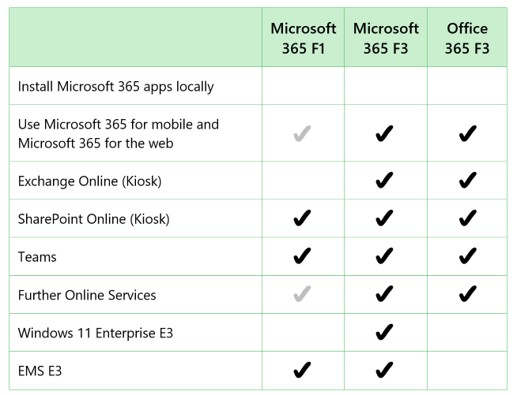
Microsoft’s Plan Comparison document is a splendid resource which is updated regularly and will assist you in finding out about the (seemingly endless) individual components that are included In the Microsoft 365 F1/F3 and Office 365 F3 plans.
History
There were changes to the line-up of the Frontline Worker plans in April 2020. Prior to that date, there were two plans – Office 365 F1 and Microsoft 365 F1. On April 1, 2020 these were renamed to the F3 versions, and a new Microsoft 365 F1 suite was launched with a subset of the features, as shown above.