Table of contents
Collapse all-
LICENSING ONLINE SERVICES
- Licenses for Online Services products
- License reassignment rights
- Versions and editions
- Downgrade and down-edition rights
- Online Services plans
- User types
- External users
- Types of Online Services User SLs
- License assignment
- Tenant-level services
- On-premises use rights
- Other types of Online Services licenses
- Commitment
- Buying Online Services
-
WINDOWS 11 (USER)
- Licensing Windows 11
- Activating Windows 11 Enterprise licenses
- Servicing Channels
- Hotpatching
- Licensing virtual desktops
- Additional Software Assurance benefits
- Extended Security Updates
- Copilot in Windows 11
- Windows 11 in Microsoft 365
- Step-up licenses
- Upgrades and downgrades
- Add-on licenses (To-cloud)
- From SA licenses
- Availability of Windows 11 Enterprise licenses
- Resources: Windows 11
- Microsoft resources: Windows 11
- OFFICE 365/MICROSOFT 365 TOOLS
- MICROSOFT 365 APPS
- OFFICE 365 PLANS
- EMS PLANS
-
MICROSOFT 365 PLANS FOR ENTERPRISE USERS
- Microsoft 365 E7
- Teams or (no Teams)?
- License assignment rules
- Using Windows
- Licensing for virtual desktops
- Use of the Microsoft 365 apps
- Licensing for security and compliance
- Step-up licenses
- 3-year commitment term
- Upgrades
- Add-on licenses (To-cloud)
- From SA licenses
- Special rights to Office Professional Plus
- Included Security Compute Units
- On-premises use rights
- Workplace Discount Program
- Availability of Microsoft 365 Enterprise plans
- Other interesting licenses
- Resources: Microsoft 365 plans for Enterprise users
- Microsoft resources: Microsoft 365 plans for Enterprise users
-
MICROSOFT 365 PLANS FOR SMB USERS
- Microsoft 365 Business plan licenses (original)
- Microsoft 365 Business plan licenses (no Teams)
- License assignment rules
- Combining licenses
- Using Windows
- Licensing for virtual desktops
- Use of the Microsoft 365 Apps
- Licensing for security and compliance
- Step-up licenses
- Upgrades
- Add-on licenses (To-cloud)
- From SA licenses
- On-premises use rights
- Availability of Microsoft 365 Business plans
- Resources: Microsoft 365 plans for SMB users
- Microsoft resources: Microsoft 365 plans for SMB users
-
PLANS FOR FRONTLINE WORKERS
- Frontline Worker plan licenses
- Teams or (no Teams)?
- License assignment rules
- Using Windows
- Licensing for virtual desktops
- Use of the Microsoft 365 Apps
- Licensing for security and compliance
- Step-up licenses
- Upgrades
- Add-on licenses (To-cloud)
- From SA licenses
- On-premises use rights
- Availability of plans for Frontline Workers
- Resources: Plans for Frontline Workers
- Microsoft resources: Plans for Frontline Workers
- OFFICE 365 AND MICROSOFT 365 (NO TEAMS) LICENSES
- STANDALONE ONLINE SERVICES
- MICROSOFT 365 FOR CONSUMERS
- WINDOWS 365
- VIVA
-
COPILOT
- Microsoft 365 Copilot Chat
- Microsoft Copilot Pro
- Microsoft 365 Copilot Business
- Microsoft 365 Copilot
- Microsoft 365 Copilot for Education
- Microsoft 365 Copilot for US Government
- Sales in Microsoft 365 Copilot
- Service in Microsoft 365 Copilot
- Finance Solution in Microsoft 365 Copilot
- GitHub Copilot
- Copilot in Azure
- Agent 365
- Security Copilot
- Dragon Copilot
- Copilot Studio
- Resources: Copilot
- TEAMS
- TEAMS MEETINGS AND EVENTS
- TEAMS CALLING
- TEAMS ROOMS, DEVICES, AND SPACES
- VISIO ONLINE
- MICROSOFT PROJECT
-
MICROSOFT DEFENDER
- Microsoft Defender XDR
- Microsoft 365 Defender
- Microsoft Defender for Cloud Apps
- Microsoft Defender for Office 365
- Microsoft Defender for Identity
- Microsoft Defender for Endpoint
- Microsoft Defender for Cloud
- Microsoft Defender Vulnerability Management
- Microsoft Defender Threat Intelligence
- Microsoft Defender for IoT
- Microsoft Defender for Business
- Microsoft Defender Experts
- Resources: Microsoft Defender
- Microsoft resources: Microsoft Defender
- MICROSOFT SENTINEL
- MICROSOFT INTUNE
- MICROSOFT ENTRA
- MICROSOFT PRIVA
- MICROSOFT PURVIEW
-
DYNAMICS 365 CRM APPS
- Available licenses
- User and Device Subscription Licenses
- Professional and Enterprise licenses
- Base and Attach licenses
- Team Members licenses
- Licensing external users
- Included rights and entitlements for other Dynamics apps
- Add-on licenses (In-cloud)
- Step-up licenses
- Upgrades
- On-premises use rights
- Dataverse capacity
- Availability of Dynamics 365 CRM apps licenses
- Resources: Dynamics 365 CRM apps
- Microsoft resources: Dynamics 365 CRM apps
- DYNAMICS 365 SALES
- DYNAMICS 365 CUSTOMER SERVICE
- DYNAMICS 365 CONTACT CENTER
- DYNAMICS 365 FIELD SERVICE
- DYNAMICS 365 CUSTOMER INSIGHTS
- DYNAMICS 365 MARKETING (ORGINAL)
- DYNAMICS 365 CUSTOMER INSIGHTS (ORIGINAL)
- DYNAMICS 365 CUSTOMER VOICE
-
DYNAMICS 365 ERP APPS
- User Subscription Licenses
- Base and Attach licenses
- Minimum purchasing requirements
- Team Members licenses
- License management
- Licensing external users
- Included entitlements for other apps
- Step-up licenses
- Upgrades
- On-premises use rights
- Dynamics ERP apps capacity
- Availability of Dynamics 365 ERP apps licenses
- Resources: Dynamics 365 ERP apps
- Microsoft resources: Dynamics 365 ERP apps
- DYNAMICS 365 COMMERCE
- DYNAMICS 365 FINANCE
- DYNAMICS 365 HUMAN RESOURCES
- DYNAMICS 365 SUPPLY CHAIN MANAGEMENT
- DYNAMICS 365 PROJECT OPERATIONS
- DYNAMICS 365 INTELLIGENT ORDER MANAGEMENT
- DYNAMICS 365 FRAUD PROTECTION
- DYNAMICS 365 ELECTRONIC INVOICING
-
DYNAMICS 365 BUSINESS CENTRAL
- Business Central Essentials and Premium licenses
- Business Central Device license
- Business Central Team Members license
- Base and Attach licenses
- Microsoft 365
- Licensing external users
- Business Central capacity
- Step-up licenses
- Upgrades
- On-premises use rights
- Availability of Business Central licenses
- Microsoft resources: Business Central
- DYNAMICS 365 GUIDES
- DYNAMICS 365 REMOTE ASSIST
- POWER BI
- POWER APPS
- POWER APPS PORTALS (LEGACY)
- POWER PAGES
- POWER AUTOMATE
- COPILOT STUDIO
- POWER VIRTUAL AGENTS (LEGACY)
- AI BUILDER
- DATAVERSE
- BUYING ONLINE SERVICES: EA
- BUYING ONLINE SERVICES: MPSA
- BUYING ONLINE SERVICES: SELECT PLUS
- BUYING ONLINE SERVICES: OPEN PROGRAMS
- BUYING ONLINE SERVICES: CSP (LEGACY)
- BUYING ONLINE SERVICES: CSP (NCE)
- BUYING ONLINE SERVICES: MCA-E
Resource Accounts
Overview
Resource Accounts are specialized non-user accounts that facilitate Auto Attendants and Call Queues.
- Auto Attendants act as a digital receptionist, providing a menu system that routes callers to the appropriate person, department, Call Queue, or other destination. For example, a caller can press “1” to reach the Customer Services team
- Call Queues route incoming calls to a group of call agents, distributing calls according to configured rules. For example, you can customize greeting messages, hold music, and overflow handling for calls to the Customer Services team
Licensing
A Resource Account is licensed for Teams Phone with a $0 SKU Teams Phone Resource Account license. You create the Resource Account in the Teams Admin Center and assign the Teams Phone Resource Account license to it within the Microsoft 365 Admin Center.
If you want to make use of features such as transferring calls to an external PSTN number or using callbacks for callers in a Call Queue then you also need to make sure that a mechanism is in place for PSTN calling. Thus, you would assign a Microsoft Calling Plan or use Operator Connect or Direct Routing options.
Phone numbers
Phone numbers are optional for Resource Accounts but if you want an Auto Attendant or Call Queue to be reachable directly by a phone number, you must have a Resource Account with an associated phone number. You place an order for phone numbers in the Teams Admin Center, as shown below:
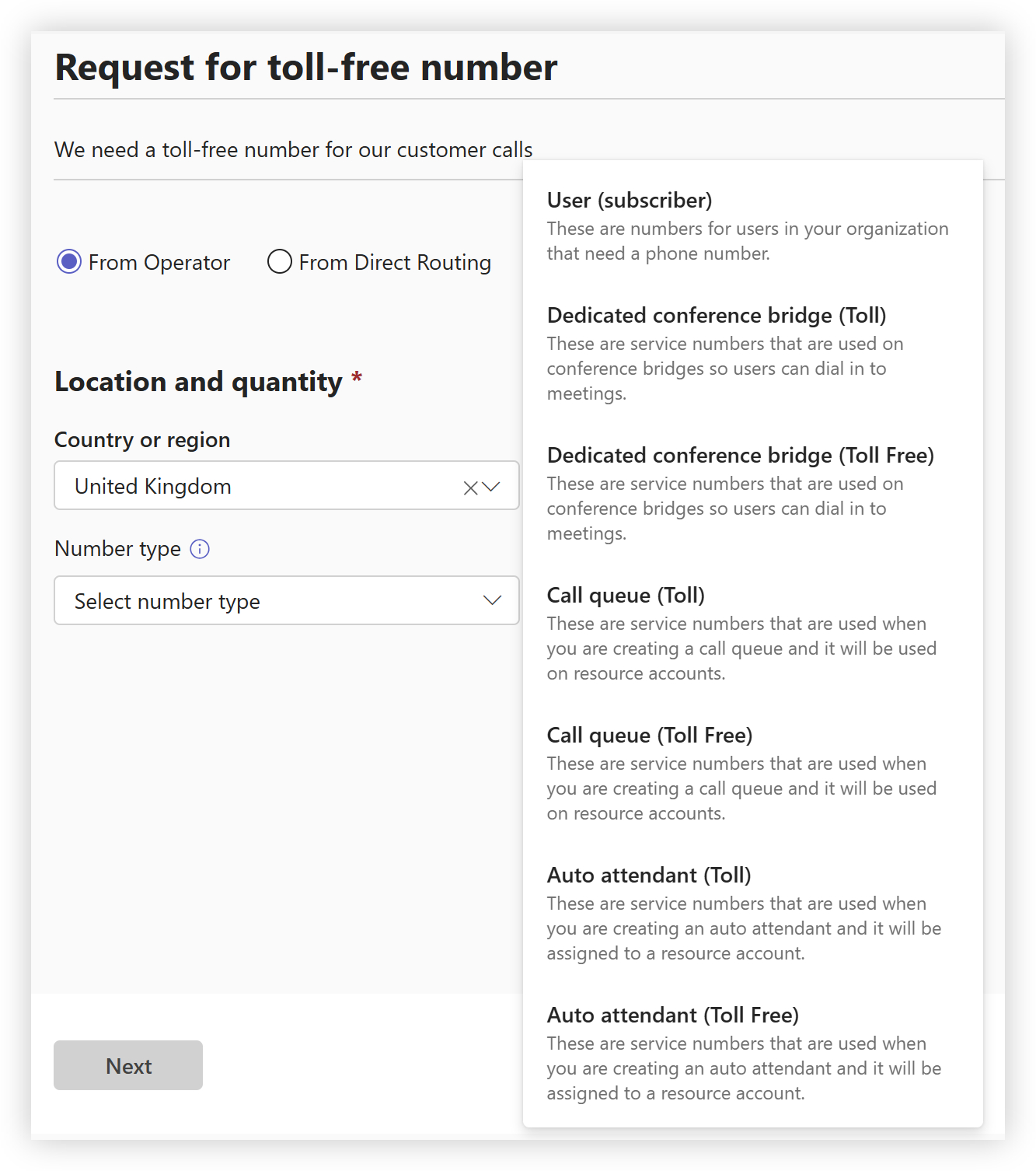
You can see that there are toll or toll-free numbers available. If you want to acquire a toll-free number then you need to make sure that overage is enabled. This means that anyone using the toll-free number won’t be charged, but the organization that owns the number will be charged on a Pay-As-You-Go basis. A toll number is a standard phone number where the caller is responsible for the calling charges.
History
Resource Accounts were once known as Virtual Users. At that time, you were allocated a specific number of Phone System Virtual User licenses. As long as you’d purchased at least one Phone System license, you were allocated 25 Virtual User licenses. Then, for every additional Phone System license, one more Virtual User license became available. Today there are no limits on the number of the $0 Teams Phone Resource Account licenses available to an organization.