
Page 43 of the June 2017 Product Terms document confirms that the new Windows 10S operating system is not eligible as a qualifying operating system for a Windows 10 Pro upgrade licence acquired through a Volume Licensing program. There is, however, the usual exception for Academic and Charity customers
Author Archives: Louise Ulrick
License Mobility Verification Guide for Customers
We found an updated (December 2016) guide snappily entitled “License Mobility through Microsoft Software Assurance Verification Guide for Customers”. Essentially, this is a useful document if you want to check out the required processes to use traditional licences with SA to license workloads in the cloud. Its main update covers the fact that you can now email the License Verification form to Microsoft.
Find the guide in the Application Servers section of our Licensing Guides emporium: http://bit.ly/MSLicensingGuides.
June 2017 SPUR
There’s an updated Services Provider Use Rights (SPUR) document for June 2017 where the major change is that the minimum of 16 Core licences is removed for R Server and fail-over rights have been granted for all editions. Find R Server on page 22.
Microsoft Hosting and CSP Newsletter
The May 2017 Hosting and Cloud Service Provider Newsletter is out. There’s just one item of licensing interest: the FY17 Q4 Quarterly Licensing Brief is on 22nd June and has some interesting topics.
Register here: http://bit.ly/2rVVZ6j to learn when to use CSP for Azure as a Managed/Hosting Service Provider, and about various hybrid or BYOL licensing scenarios for Azure Stack.
Sign up for the free newsletter here: http://bit.ly/2gbk5iR.
May 2017 Volume Licensing Newsletter
The May 2017 Microsoft Volume Licensing Newsletter is out. It has three main areas of focus: Power BI Premium, Enterprise Mobility + Security, and the Azure Hybrid Use Benefit. So, if you want to find out more about these topics or access useful resources, read and subscribe to this free newsletter here: http://bit.ly/2rdUxdM.
AHUB and Windows Server Marketplace Images
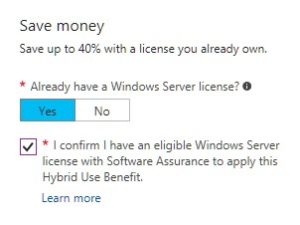
Changes to the Windows Server Azure Marketplace images means it’s easier to deploy a virtual machine when you want to use the Azure Hybrid Use Benefit (AHUB). Now you don’t have to choose a special image, you just confirm you have Windows Server licences with active SA as part of the process – see the diagram below. And, even better, this is available for all customers, not just EA customers.
The AHUB Datasheet and FAQ documents are updated for this change and you can find them in the Core Infrastructure section of our Licensing Guides emporium: http://bit.ly/MSLicensingGuides.
Azure Pricing Calculator Preview
There’s a new Azure Pricing Calculator in preview from Microsoft. Take a look, see what you think, and leave feedback if you’d like to: http://bit.ly/2qxqriw.
Windows Server 2016 Licensing Guide
There’s a brand new (May 2017) Windows Server 2016 Licensing Guide released by Microsoft. It’s a delicious 31 pages of licensing loveliness, but here are our highlights:
- Core Packs: there’s confirmation of the new 16-core packs on page 7, but an interesting note points out that although the cost of eight 2-packs equals one 16-pack, they may not have the same point count in Volume Licensing programs where this matters – MPSA or Open, for example. There’s also confirmation on page 21 (Q4) that the licences from a multi-pack can be split across servers, they’re not joined forever at purchase point
- Nano Server: this is a deployment option available only if you have SA on your Windows Server licences, and page 6 confirms that you also need SA on any Windows Server CALs too
- Core Migration: there’s a lot of guidance on migrating from Processor-based to Core licences and, in particular, there are a couple of pages of FAQs starting on page 26, including what happens with Core licence grants if you have a subscription agreement, and how the grants appear in your licensing portal
- Standard or Datacenter: there’s a useful table on page 25 which shows the breakeven point for virtual machines running on a 2-processor server which has 8 cores per processor. You’ll find that if you’re running 13 or more virtual machines on this server, then it’s cheaper to license with Datacenter edition
As usual, you can find this Licensing Guide with all of its Licensing Guide family and friends at: http://bit.ly/MSLicensingGuides.
Dynamics 365 Enterprise Licensing Guide
There’s an updated (May 2017) Dynamics 365 Enterprise Licensing Guide with two main changes. Firstly, the inclusion of the new Operations Activity USL for those users who are heavy users of Operations but don’t need the use rights of a full user. It’s introduced on page 12 and you can see what rights this USL gives in the tables on page 35 onwards. The other change is the removal of tiered pricing for the Team Members USL with page 24 confirming that it’s now just available for Plan 1 USLs.
Get the guide at the usual place: http://bit.ly/MSLicensingGuides.
SharePoint Server Volume Licensing Brief
There’s an updated (April 2017) Licensing SharePoint Server Volume Licensing Brief from Microsoft. There are no significant changes but this is a useful document if you haven’t come across it before, covering the licensing of SharePoint in intranet, extranet and Internet scenarios.
Find it in the Application Servers section of our Licensing Guides emporium: http://bit.ly/MSLicensingGuides.