Table of contents
Collapse all-
LICENSING ON-PREMISES PRODUCTS
- Licenses for on-premises products
- Perpetual and subscription licenses
- License reassignment rights
- Versions and editions
- Downgrade and down-edition rights
- Product use rights
- Software Assurance
- Step-up licenses
- External users
- Assigning server licenses to dedicated and shared hardware
- Using Online Services licenses to access on-premises servers
-
WINDOWS SERVER 2025
- Windows Server Calculator
- Licensing Windows Server 2025
- Licensing external users
- Licensing virtual machines
- Licensing a server farm
- Licensing Windows Server Containers
- Licensing for Disaster Recovery
- Downgrade and down-edition rights
- CAL equivalent licenses
- Step-up licenses
- Servicing Channels
- Hotpatching
- Extended Security Updates
- Licensing for the cloud
- Windows Server Software Subscriptions
- Pay-As-You-Go licensing option
- Azure Arc-enabled server benefits
- Windows Server 2025 Essentials edition
- Availability of Windows Server 2025 licenses
- Microsoft resources: Windows Server 2025
- WINDOWS SERVER 2025 SERVICES
-
WINDOWS SERVER 2022
- Windows Server Calculator
- Licensing Windows Server 2022
- Licensing external users
- Licensing virtual machines
- Licensing a server farm
- Licensing Windows Server Containers
- Licensing for Disaster Recovery
- Downgrade and down-edition rights
- CAL equivalent licenses
- Step-up licenses
- Servicing Channels
- Hotpatching
- Extended Security Updates
- Licensing for the cloud
- Windows Server Software Subscriptions
- Windows Server 2022 Essentials edition
- Availability of Windows Server 2022 licenses
- Microsoft resources: Windows Server 2022
- WINDOWS SERVER 2022 SERVICES
- SYSTEM CENTER 2025
-
SYSTEM CENTER 2022
-
SYSTEM CENTER 2022: SERVERS
- Licensing System Center 2022 for servers
- Licensing external users
- Licensing virtual machines
- Licensing a server farm
- Licensing for Disaster Recovery
- Downgrade and down-edition rights
- System Center Branches
- Licensing for the cloud
- Step-up licenses
- Required infrastructure products
- Core Infrastructure Server Suites
- System Center Software Subscriptions
- Availability of System Center 2022 Server MLs
- SYSTEM CENTER 2022: CLIENTS
- Microsoft resources: System Center 2022
-
SYSTEM CENTER 2022: SERVERS
-
SQL SERVER 2025
- SQL Server Calculator
- Licensing SQL Server 2025
- Licensing external users
- Licensing virtual machines
- Licensing SQL Server with container technology
- Licensing a server farm
- Licensing for High Availability and Disaster Recovery
- Downgrade and down-edition rights
- CAL equivalent licenses
- SQL Server Enterprise Server licenses
- Step-up licenses
- Extended Security Updates
- Licensing for the cloud
- Power BI Report Server
- SQL Server Software Subscriptions
- Pay-As-You-Go (PAYG) licensing
- Additional editions of SQL Server
- Availability of SQL Server 2025 licenses
- Resources: SQL Server 2025
- Microsoft resources: SQL Server 2025
-
SQL SERVER 2022
- SQL Server Calculator
- Licensing SQL Server 2022
- Licensing external users
- Licensing virtual machines
- Licensing SQL Server with container technology
- Licensing a server farm
- Licensing for High Availability and Disaster Recovery
- Downgrade and down-edition rights
- CAL equivalent licenses
- SQL Server Enterprise Server licenses
- Step-up licenses
- Extended Security Updates
- Licensing for the cloud
- Additional Software Assurance benefits
- SQL Server Software Subscriptions
- Pay-As-You-Go (PAYG) licensing
- Additional editions of SQL Server
- Availability of SQL Server 2022 licenses
- Microsoft resources: SQL Server 2022
- SQL SERVER 2019
- SQL SERVER 2017
- SQL SERVER 2016
-
BIZTALK SERVER 2020
- Licensing BizTalk Server 2020
- Licensing external users
- Licensing virtual machines
- Licensing a server farm
- Licensing for Disaster Recovery
- Downgrade and down-edition rights
- Step-up licenses
- Licensing for the cloud
- Required infrastructure products
- BizTalk Server 2020 Developer edition
- Availability of BizTalk Server 2020 licenses
- HOST INTEGRATION SERVER 2028
-
PROJECT SERVER SUBSCRIPTION EDITION (SE)
- Project Server 2019 and Project Server SE
- Licensing Project Server SE
- Licensing external users
- Licensing virtual machines
- Licensing a server farm
- Licensing for Disaster Recovery
- Downgrade and down-edition rights
- CAL equivalent licenses
- Licensing for the cloud
- Required infrastructure products
- Availability of Project Server SE licenses
-
PROJECT SERVER 2019
- Project Server 2019 and Project Server SE
- Licensing Project Server 2019
- Licensing external users
- Licensing virtual machines
- Licensing a server farm
- Licensing for Disaster Recovery
- Downgrade and down-edition rights
- CAL equivalent licenses
- Licensing for the cloud
- Required infrastructure products
- Availability of Project Server 2019 licenses
- PROJECT SERVER 2016
- EXCHANGE SERVER SUBSCRIPTION EDITION (SE)
-
EXCHANGE SERVER 2019
- Exchange Server 2019 and Exchange Server SE
- Licensing Exchange Server 2019
- Licensing external users
- Licensing virtual machines
- Licensing a server farm
- Licensing for Disaster Recovery
- Exchange Server 2019 server editions
- Downgrade and down-edition rights
- Step-up licenses
- Exchange Online Voice Mail Service
- CAL equivalent licenses
- Licensing for the cloud
- Availability of Exchange Server 2019 licenses
- Microsoft resources: Exchange Server 2019
- EXCHANGE SERVER 2016
-
SHAREPOINT SERVER SUBSCRIPTION EDITION (SE)
- SharePoint Server 2019 and SharePoint Server SE
- Licensing SharePoint Server SE
- Licensing external users
- Licensing virtual machines
- Licensing a server farm
- Licensing for Disaster Recovery
- Downgrade and down-edition rights
- CAL equivalent licenses
- Licensing for the cloud
- Required infrastructure products
- Availability of SharePoint Server SE licenses
-
SHAREPOINT SERVER 2019
- SharePoint Server 2019 and SharePoint Server SE
- Licensing SharePoint Server 2019
- Licensing external users
- Licensing virtual machines
- Licensing a server farm
- Licensing for Disaster Recovery
- Downgrade and down-edition rights
- CAL equivalent licenses
- Licensing for the cloud
- Required infrastructure products
- Availability of SharePoint Server 2019 licenses
- Microsoft resources: SharePoint Server 2019
- SHAREPOINT SERVER 2016
- SKYPE FOR BUSINESS SERVER SUBSCRIPTION EDITION (SE)
-
SKYPE FOR BUSINESS SERVER 2019
- Skype for Business Server 2019 and Skype for Business Server SE
- Licensing Skype for Business Server 2019
- Licensing external users
- Licensing virtual machines
- Licensing a server farm
- Licensing for Disaster Recovery
- Downgrade and down-edition rights
- CAL equivalent licenses
- Licensing for the cloud
- Required infrastructure products
- Availability of Skype for Business Server 2019 licenses
- Microsoft resources: Skype for Business Server 2019
- SKYPE FOR BUSINESS SERVER 2015
- THE CAL SUITES
-
DYNAMICS 365 SERVER
- Licensing Dynamics 365 Server
- Licensing external users
- Licensing virtual machines
- Licensing a server farm
- Licensing for Disaster Recovery
- Downgrade and down-edition rights
- Step-up licenses
- CAL equivalent licenses
- Licensing for the cloud
- Additional Software Assurance benefits
- Required infrastructure products
- Availability of Dynamics 365 Server licenses
- Microsoft resources: Dynamics 365 Server
-
DYNAMICS 365 FOR OPERATIONS SERVER
- Licensing Dynamics 365 for Operations Server
- Licensing external users
- Licensing virtual machines
- Licensing a server farm
- Licensing for Disaster Recovery
- Licensing for failover
- Downgrade and down-edition rights
- Step-up licenses
- CAL equivalent licenses
- Licensing for the cloud
- Required infrastructure products
- Availability of Dynamics 365 for Operations Server licenses
- DYNAMICS 365 BUSINESS CENTRAL ON-PREMISES
-
WINDOWS 11 (DEVICE)
- Licensing Windows 11
- Downgrade and down-edition rights
- Servicing Channels
- License reassignment rights
- Licensing a Virtual Desktop Infrastructure
- Additional Software Assurance benefits
- Extended Security Updates
- Availability of Windows 11 device licenses
- Resources: Windows 11
- Microsoft resources: Windows 11
-
OFFICE LTSC 2024
- Licensing Office LTSC 2024
- Multiple installation rights
- Portable use rights
- Licensing Office to run on a server
- Work at Home licenses
- Workplace Discount Program
- Microsoft 365 Web Apps and Office Online Server
- Downgrade and down-edition rights
- Step-up licenses
- Availability of Office LTSC 2024 licenses
- Microsoft resources: Office LTSC 2024
-
OFFICE LTSC 2021
- Licensing Office LTSC 2021
- Multiple installation rights
- Portable use rights
- Licensing Office to run on a server
- Work at Home licenses
- Workplace Discount Program
- Microsoft 365 Web Apps and Office Online Server
- Downgrade and down-edition rights
- Step-up licenses
- Availability of Office LTSC 2021 licenses
- Microsoft resources: Office LTSC 2021
- VISIO LTSC 2024
- VISIO LTSC 2021
- PROJECT 2024
- PROJECT 2021
-
SOFTWARE ASSURANCE
- General SA benefits
- SA benefits for Windows
- SA benefits for the Office applications
- SA benefits for server deployment
- SA benefits for additional products and services
- SA benefits for virtualization
- SA benefits for the cloud
- SA benefits for training and support
- Resources: Software Assurance
- Microsoft resources: Software Assurance
- SPLA
-
BUYING ON-PREMISES PRODUCTS: EA
- Enterprise Enrollment
- Enterprise Subscription Enrollment
-
Server and Cloud Enrollment
- Product availability
- License type availability
- Enterprise-wide commitment
- Application Platform component
- Core Infrastructure component
- Developer Tools component
- Pricing
- Price protection, payment, Additional Products
- Software Assurance benefits
- Managing licenses
- At the end of a Server and Cloud Enrollment
- Microsoft resources: EA
- BUYING ON-PREMISES PRODUCTS: MPSA
- BUYING ON-PREMISES PRODUCTS: SELECT PLUS
- BUYING ON-PREMISES PRODUCTS: OPEN PROGRAMS
- BUYING ON-PREMISES PRODUCTS: CSP
- BUYING ON-PREMISES PRODUCTS: MCA-E
Azure Arc-enabled server benefits
Overview
In November 2024 Microsoft made a set of Azure’s server management capabilities free for eligible customers running Windows Server on Azure Arc-enabled machines. If you’re running a Pay-As-You-Go server or it’s covered with licenses with Software Assurance or Software Subscriptions, then these services are included:
- Azure Update Manager
- Azure Change Tracking and Inventory
- Azure Machine Configuration
- Windows Admin Center
- Remote Support
- Network HUD
- Best Practices Assessment
- Azure Site Recovery Configuration
Activating the benefits
If you’ve got a Pay-As-You-Go server then the benefits are available automatically, but for other eligible servers the benefits need to be activated manually. In the picture from Microsoft below, you can see the Licenses section in the Azure Arc blade of the Azure Management Portal. There’s a list of servers which are Azure Arc-enabled but we can see that the benefits are not activated. Selecting the activation option shows the screen at the right-hand side where you can attest that you have the required licenses and activation takes place.
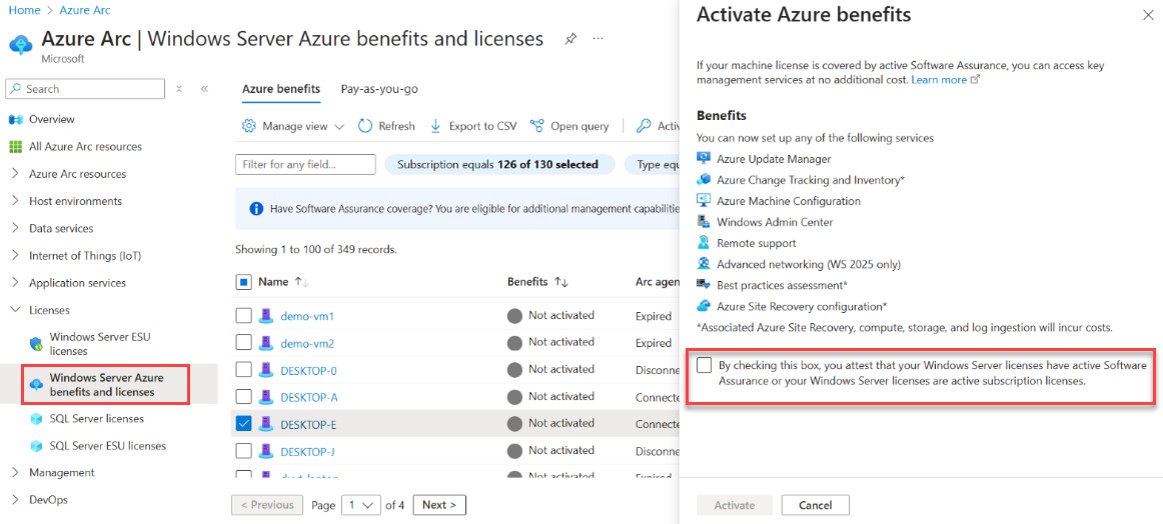
In December 2025 Microsoft made an Azure Policy available to make an administrator’s life easier. When implemented, this policy continuously monitors the Azure Arc environment, automatically identifying newly added machines and highlighting those missing the required benefits. It’s then an easy job for an administrator to initiate a remediation task to enable some or all of these servers for the benefits.