Table of contents
Collapse all- LICENSING AZURE
- AZURE CONSUMPTION SERVICES
- WINDOWS SERVER VIRTUAL MACHINES
- AZURE LINUX
- AZURE SQL SOLUTIONS
- AZURE DATABASES
- AZURE RESERVATIONS
- CAPACITY RESERVATIONS
- AZURE SAVINGS PLANS
- AZURE DEDICATED HOST
- AZURE LOCAL
- AZURE STACK
- SPECIALIST VIRTUAL MACHINES
- AZURE VIRTUAL DESKTOP
- MICROSOFT MARKETPLACE
- AZURE ARC
- AZURE IOT OPERATIONS
- AZURE DATA BOX
- MICROSOFT FOUNDRY
- MICROSOFT FABRIC
-
BUYING AZURE SERVICES: EA
- Buying Azure services through the Enterprise Enrollments
- Buying Azure services through an SCE
- Microsoft resources: EA
- BUYING AZURE SERVICES: MPSA
- BUYING AZURE SERVICES: SELECT PLUS
- BUYING AZURE SERVICES: OPEN PROGRAMS
- BUYING AZURE SERVICES: CSP
- BUYING AZURE SERVICES: MCA-E
Purchasing an Azure Savings Plan
Overview
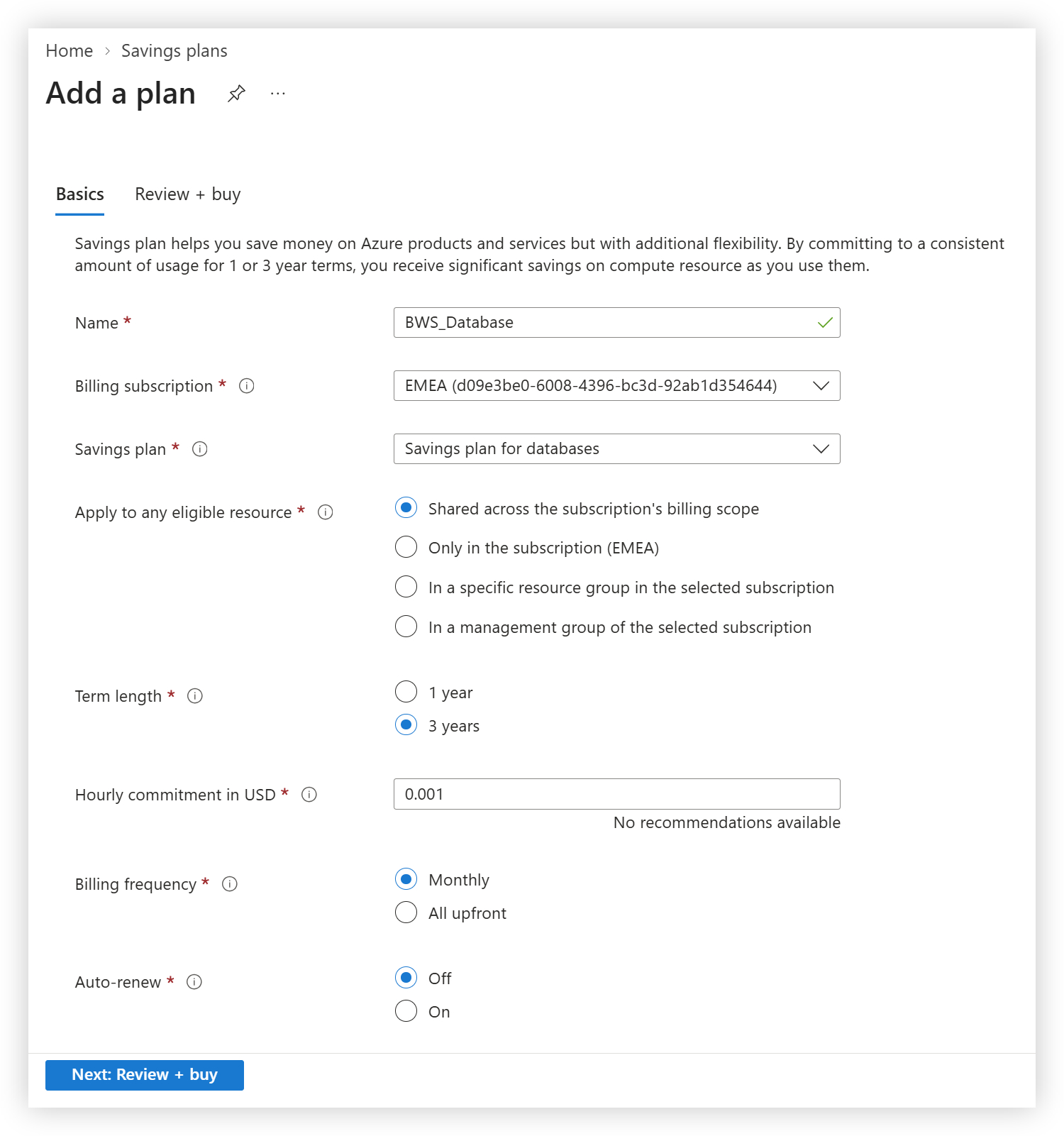
Azure Savings Plans are purchased through the Azure Management Portal where the first few options require you to name the plan, select the Azure Subscription to which it will be charged, and choose whether you want to create an Azure Savings Plan for Compute or for Databases. You can see these options at the top of the snippet below:
Configuring an Azure Savings Plan
Scope
When an Azure Savings Plan is purchased it may be assigned to a specific Resource Group, or to a single Subscription, or to all Subscriptions, or to a Management Group, which is a group of specific Subscriptions. If required, the scope may be changed at any time during the term of the Azure Savings Plan.
Term
For both types of Azure Savings Plan you can choose a 1- or 3-year term, with the biggest discounts available for the 3-year commitment.
Hourly commitment
This is the amount you’re committing to for each hour of the term, and as you enter a figure the monthly and total costs are displayed. If you’ve been using any resources that would be eligible for the type of Azure Savings Plan that you’ve chosen, then Azure Advisor will make recommendations in this section of the dialog box. You could also use the instructions provided in this Azure Savings Plans Inspector article to pull data out of the Cost Management REST API to give you more insight on the right figure to choose.
Billing and payment options
You can choose to pay for an Azure Savings Plan upfront or monthly and there are no penalties (in terms of higher costs) for choosing a monthly option. If an Azure Savings Plan is purchased through a CSP partner then the partner could compile any payment terms (annual, for example) that are acceptable to, or desired by, their customer. If an Azure Savings Plan is purchased through an Enterprise Agreement, then it is paid for from the Azure Prepayment balance or, if that is at zero, as an overage payment on the next monthly bill.
Exchanging and canceling
Azure Savings Plans may not be exchanged or canceled.
Automatic renewal
An Azure Savings Plan does not automatically renew, but customers are sent notifications about upcoming expiration, and can choose to opt in to automatically renew the Azure Savings Plan at any time. This will purchase a new Azure Savings Plan at the relevant time rather than extending the term of an existing one. If an Azure Savings Plan is not set to automatically renew then there is no interruption to the covered workloads, they just start being charged at regular metered prices. As soon as another Azure Savings Plan is purchased it is automatically applied to the relevant workloads.
History
When the Azure Savings Plan for Databases was launched on March 18, 2026, it was only available as a 1-year term. The 3-year term was added on September 11, 2026.