Table of contents
Collapse all- EA vs CSP
- INTRODUCTION TO MICROSOFT LICENSING
- AZURE HYBRID BENEFIT: LINUX VMS
- AZURE HYBRID BENEFIT: WINDOWS SERVER
- FLEXIBLE VIRTUALIZATION BENEFIT
- AZURE HYBRID BENEFIT: SQL SERVER
- LICENSE MOBILITY THROUGH SA
- LICENSING CSP-HOSTER SOLUTIONS
- LIFECYCLE POLICIES
- ESUs: WINDOWS 7
- ESUs: WINDOWS 10
- LICENSE DEPLOYMENT OPTIONS
- ESUs: WINDOWS SERVER 2008/2008 R2
- ESUs: WINDOWS SERVER 2012/2012 R2
- ESUs: WINDOWS SERVER 2016
- ESUs: SQL SERVER 2008/2008 R2
- ESUs: SQL SERVER 2012
- ESUs: SQL SERVER 2014
- ESUs: SQL SERVER 2016
- PRICING AND PROMOTIONS
-
DEVELOPER TOOLS
- Visual Studio 2026
- Visual Studio 2022 Standard subscriptions
- Visual Studio 2022 Cloud subscriptions
- Azure DevOps Server
-
Azure DevOps Server 2022
- Licensing Azure DevOps Server 2022
- Licensing users with Visual Studio subscriptions
- Licensing external users
- Licensing virtual machines
- Licensing a server farm
- Licensing for Disaster Recovery
- Downgrade and down-edition rights
- CAL equivalent licenses
- Licensing for the cloud
- Required infrastructure products
- Availability of Azure DevOps Server 2022 licenses
- Azure DevOps Services
- Microsoft Dev Box
- Dev/Test Subscriptions
- Resources: developer tools
- Microsoft resources: developer tools
- GITHUB
- PARTNER CENTER ANNOUNCEMENTS
- LICENSING GUIDES GALLERY
- PRODUCT TERMS CAUTIONARY NOTES
Enabling ESUs
Azure VMs
SQL Iaas Agent Extension
If you run SQL Server 2016 in an Azure VM then the VM needs to be registered with the SQL IaaS Agent Extension so that Azure can see into a VM to detect the edition of SQL Server that is running. If you’ve deployed an Azure Marketplace image then this extension is pre-installed. If you’ve deployed a self-installed VM then you need to manually register with the extension. You can either do this on an instance-by-instance basis, or you can do things at scale by registering all SQL Server VMs in a Subscription automatically or by using a script to register multiple VMs in bulk.
Enabling ESUs
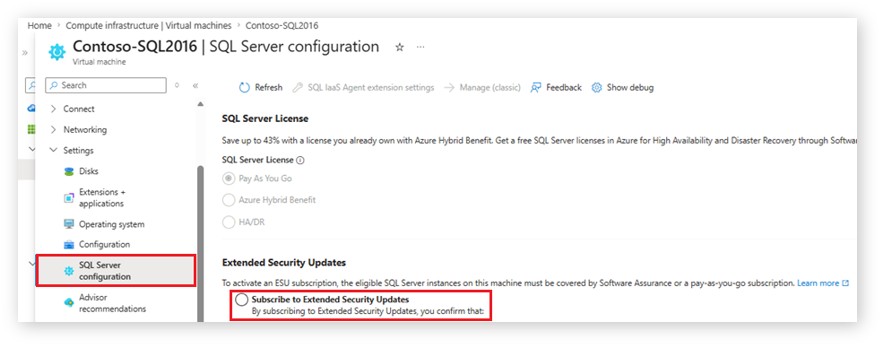
ESUs are then enabled for a SQL Server 2016 instance using its configuration settings, as shown in the Microsoft snippet below:
ESU patch installation
VMs that have automatic updates enabled through the SQL IaaS Agent Extension receive ESU updates automatically, delivered through any patching product or service that installs Microsoft patches. You can also manually download ESUs from the Azure Management Portal.
All other environments
Connecting to Azure Arc
If you run SQL Server 2016 in any other environment other than Azure VMs you need to connect your servers to Azure Arc. You can do this for an individual instance, or you have options for connecting machines at scale.
Enabling ESUs
ESUs are then enabled for a SQL Server 2016 instance using its configuration settings as shown in the Microsoft snippet below:
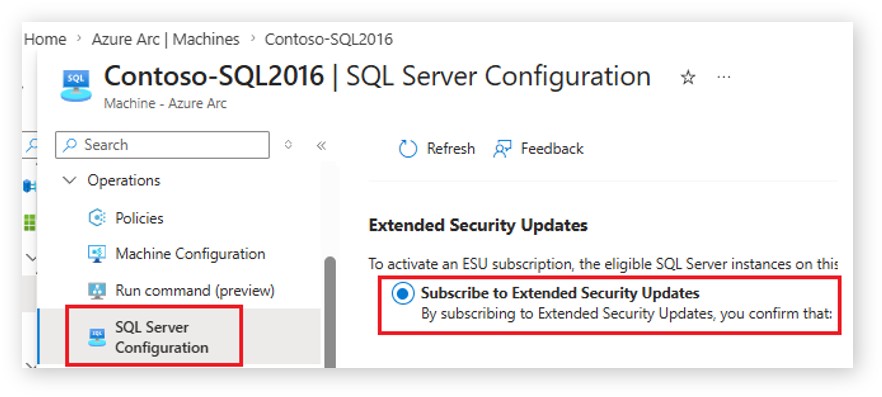
You can also enable ESUs on multiple Azure-Arc enabled machines by using an Azure Policy – find instructions here.
ESU patch installation
Instances that have automatic updates enabled receive ESU updates automatically, delivered through any patching product or service that installs Microsoft patches. You can also manually download ESUs from the Azure Management Portal.